
가자미의 파닥파닥 프로그래밍
HackerRank - The Report 본문
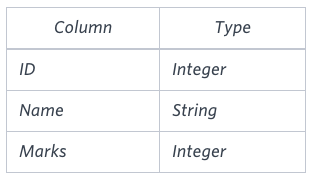
You are given two tables: Students and Grades. Students contains three columns ID, Name and Marks.
Grades contains the following data:
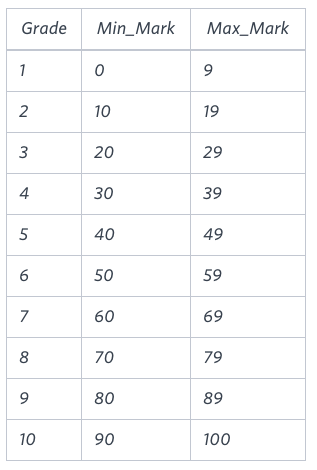
Ketty gives Eve a task to generate a report containing three columns: Name, Grade and Mark. Ketty doesn't want the NAMES of those students who received a grade lower than 8. The report must be in descending order by grade -- i.e. higher grades are entered first. If there is more than one student with the same grade (8-10) assigned to them, order those particular students by their name alphabetically. Finally, if the grade is lower than 8, use "NULL" as their name and list them by their grades in descending order. If there is more than one student with the same grade (1-7) assigned to them, order those particular students by their marks in ascending order.
Write a query to help Eve.
Sample Input
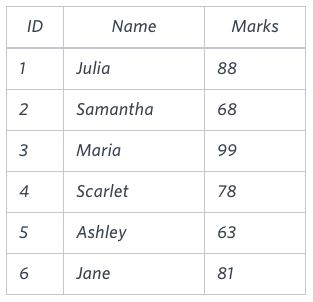
Sample Output
Maria 10 99
Jane 9 81
Julia 9 88
Scarlet 8 78
NULL 7 63
NULL 7 68
Note
Print "NULL" as the name if the grade is less than 8.
Explanation
Consider the following table with the grades assigned to the students:
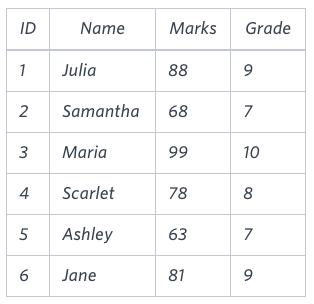
So, the following students got 8, 9 or 10 grades:
- Maria (grade 10)
- Jane (grade 9)
- Julia (grade 9)
- Scarlet (grade 8)
풀이
일단 영어로 되어있어서 무슨 내용인지 알아 보겟습니다. 학생들의 ID, 이름, 점수가 기록된 테이블 Students와, 각 등급마다 최소, 최대 점수가 적혀진 grade 테이블이 존재합니다. ketty가 eve에게 학생들이 받은 점수에 대한 등급을 매기는 보고서를 작성하라고 시켰습니다. 단, 리포트 작성시 등급이 8 이하인 학생의 이름은 NULL로 표기하며, 등급이 같을 경우 이름을 내림차순으로 정렬하고, 이름에 대해서는 사전식으로 정렬, 점수에 대해서는 오름차순으로 정렬해 달라고 합니다.
이 문제는 결국 조건 분기, 범위 조인, 정렬 순서 잘 조절하면 됩니다.먼저 students 테이블과 grade 테이블을 조인을 해야하는데 일치하는 키가 없습니다. 하지만, 최소 최대 점수를 합치면 하나의 키처럼 작용할 수 있기에 최소 최대 점수의 범위를 키로 잡고 조인을 합니다. 그러면 각 학생마다 등급이 정해지고, 이 등급을 기준으로 8점 아래인 학생들의 이름을 NULL로 분기 시켜 줍니다. 마지막으로 등급 내림차순, 이름 사전식, 점수 오름차순으로 정렬 해주기만 하면 됩니다.
select if(grade < 8,'NULL',name), grade, marks
from students join grades on marks between min_mark and max_mark
order by grade desc, name, marks;